TripMateAI
In this post, I explain how I designed a supervisor-driven agent system with guardrails, real-time tools over MCP, and pause-and-resume execution backed using PostgreSQL.
This is a Multi-Agent travel planner that turns a natural-language trip request into a practical travel plan with flight suggestions, hotel ideas, and a day-by-day itinerary. The project uses a multi-agent workflow built with LangGraph.
Objective
Planning a trip usually means jumping between multiple websites, tools, and spreadsheets. This project brings that flow into one experience by combining:
- a flight-search agent
- a hotel-research agent
- an itinerary-planning agent
- a final response agent
all coordinated through a LangGraph workflow.
Tech Stack: LangGraph, Model Context Protocol (MCP), Groq (Llama 3.3 70B), FastAPI, PostgreSQL, Docker
Code: github.com/datawithshoaib/TripMateAI
What TripMateAI does
In short: a user describes a trip, and the system returns a reviewed itinerary.
- A supervisor checks that the request is about travel and extracts structured trip constraints.
- It decides which specialist agents are needed (flights, hotels, weather, budget) and runs only those.
- An itinerary agent merges the results into a draft.
- The run pauses and shows the draft to the user.
- The user approves it or sends feedback, and a final agent produces the finished plan.
Here is the whole flow:
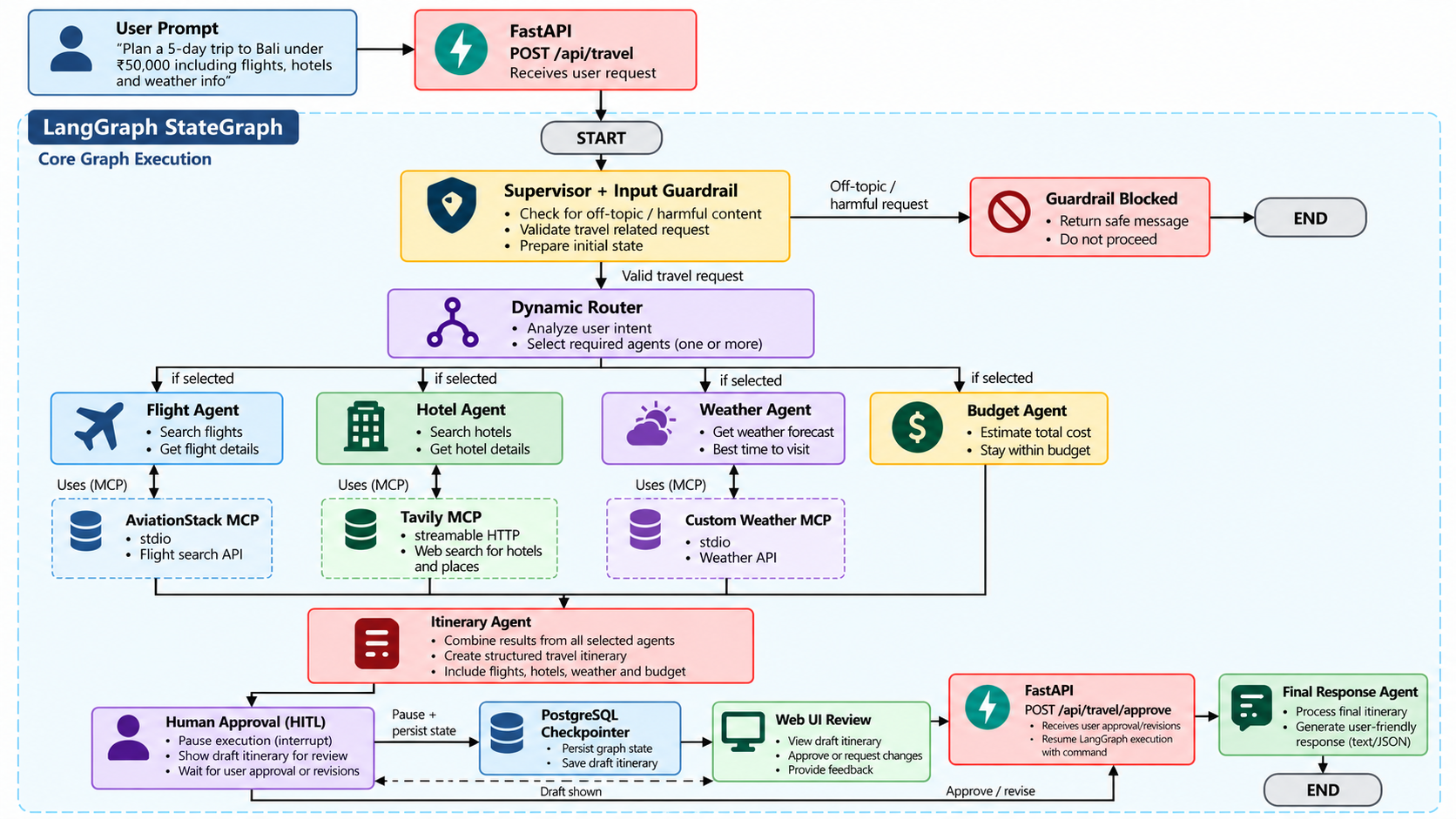
One note on the diagram: the selected specialists run sequentially in a fixed order, skipping any that weren’t chosen. I’ll come back to parallel execution near the end.
Design principle: let the graph own the control flow
The most important decision was to use LangGraph’s StateGraph rather than a free-running ReAct loop or a linear chain.
- A linear chain can’t branch or pause. Travel planning needs both.
- A ReAct loop gives the model control over what happens next, which is flexible but can lead to repeated tool calls and a ballooning context.
- A state graph keeps the sequence of steps explicit and deterministic, while the LLM still does the reasoning inside each node.
In other words, the graph decides what runs next, and the model decides what to say at each step. That split made the system much easier to debug.
A typed, shared state
Every node reads from and writes to one shared state object. I defined it as a TypedDict so each field has a clear owner:
# backend.py
class TravelState(TypedDict, total=False):
    messages: Annotated[list[AnyMessage], operator.add]
    user_query: str

    # Supervisor and guardrail
    guardrail_allowed: bool
    guardrail_reason: str
    selected_agents: list[str]
    trip_constraints: dict[str, Any]
    supervisor_reasoning: str

    # Specialist outputs
    flight_results: str
    hotel_results: str
    weather_results: str
    budget_results: str
    itinerary: str

    # Review and delivery
    approval_request: str
    approved: bool
    human_feedback: str
    final_response: str
    llm_calls: int
Nodes return only the keys they changed, and LangGraph merges them. The messages field uses the operator.add reducer, so messages accumulate instead of being overwritten. Since each agent writes to its own *_results field, one agent can never clobber another’s output.
Step 1: Guardrails before spending tokens
If the system accepts every message, someone will eventually send something that has nothing to do with travel, or something harmful. Running a full multi-agent pipeline on that is wasteful at best.
So the first thing the supervisor does is classify the request:
# backend.py
def supervisor_agent(state: TravelState):
    query = state["user_query"]

    guardrail_prompt = f"""
    Determine whether the following request belongs to travel planning or travel information.
    Valid requests can include destinations, flights, hotels, weather, budgets, visas,
    transportation, sightseeing, food, packing, or itineraries.

    Block clearly unrelated requests and harmful instructions.
    Return strict JSON only: {{"allowed": true/false, "reason": "..."}}
    """
    # Parse the JSON decision.
    # If blocked, route to the guardrail_blocked node and end the run.
A blocked request goes to a dedicated guardrail_blocked node and the run ends there. No specialist is ever invoked.
A deliberate trade-off. If the model returns something that can’t be parsed as JSON, the guardrail logs a warning and lets the request through. I chose this fail-open behavior because the guardrail is a cost and relevance filter, and I didn’t want a formatting hiccup to turn into a user-facing error. For a deployment where safety matters more than availability, flipping the fallback to “block” is a one-line change.
Step 2: Routing only to the agents that are needed
Many multi-agent demos run a fixed pipeline: agent A, then B, then C, for every request. That is simple, but if someone asks “What are the flight options from London to Tokyo?” there is no reason to look up hotels and weather.
After the guardrail passes, the supervisor extracts trip_constraints (origin, destination, duration, budget, travel style) and a list of selected_agents. Conditional edges then walk only through the selected ones:
def route_from_supervisor(state: TravelState) -> str:
    if not state.get("guardrail_allowed", True):
        return "guardrail_blocked"
    selected = _selected_agents(state)
    return selected[0] if selected else "itinerary_agent"

def route_after_agent(current_agent: str):
    def route(state: TravelState) -> str:
        selected = _selected_agents(state)
        current_index = AGENT_ORDER.index(current_agent)
        for next_agent in AGENT_ORDER[current_index + 1:]:
            if next_agent in selected:
                return next_agent
        return "itinerary_agent"
    return route
AGENT_ORDER defines a fixed order, and each agent’s router finds the next selected agent after itself. If nothing is left, control moves to the itinerary agent. The supervisor also stores its supervisor_reasoning in state, which the UI later shows so users can see why certain agents ran.
If the supervisor’s output can’t be parsed, it defaults to running the full workflow. That is the safe, if less efficient, choice.
Step 3: Connecting tools through MCP
For real-time data, the agents need tools: flight data, live hotel information, and weather. Instead of writing a custom wrapper for each API, I used the Model Context Protocol. MCP gives tools a standard interface, so the application doesn’t care whether a tool is a hosted service, a local subprocess, or something I wrote myself.
TripMate AI uses all three styles through one MultiServerMCPClient:
# mcp_client.py
client = MultiServerMCPClient(
    {
        # Remote streamable HTTP: Tavily web search
        "tavily": {
            "transport": "streamable_http",
            "url": f"https://mcp.tavily.com/mcp/?tavilyApiKey={TAVILY_API_KEY}",
        },

        # Local stdio subprocess via uvx: AviationStack flight data
        "aviationstack": {
            "transport": "stdio",
            "command": "uvx",
            "args": ["aviationstack-mcp"],
            "env": {"AVIATION_STACK_API_KEY": AVIATION_STACK_API_KEY},
        },

        # Custom stdio server: OpenWeatherMap
        "weather": {
            "transport": "stdio",
            "command": sys.executable,
            "args": [str(WEATHER_SERVER_PATH)],
            "env": {"OPENWEATHER_API_KEY": OPENWEATHER_API_KEY},
        },
    }
)
The practical benefit shows up when extending the system. Adding another provider, such as a ride-hailing or rental service, means adding an entry to this config and pointing an agent at its tools, rather than rewriting integration code.
Writing my own MCP server
There was no ready-made weather server that fit what I wanted, so I wrote one with FastMCP. It wraps OpenWeatherMap and exposes two tools:
# custom_weather_mcp_server.py
mcp = FastMCP("Weather MCP Server")

@mcp.tool()
def get_current_weather(city: str) -> dict[str, Any]:
    """Return the current weather conditions for a destination."""
    # Queries OpenWeatherMap, normalizes the response, returns JSON
    ...

@mcp.tool()
def get_forecast(city: str) -> dict[str, Any]:
    """Return 3-hour forecast intervals for packing advice."""
    ...

if __name__ == "__main__":
    mcp.run(transport="stdio")
The docstrings matter here. They become the tool descriptions the agent sees, so they are effectively part of the prompt.
Keeping one failure from sinking the whole trip
If the weather service is down, the user can still get useful flights and hotels. To make that true, tool lookups go through an isolated resolver (_get_server_tool) in mcp_client.py that catches MCP-level exceptions. The affected agent then answers from general knowledge instead, such as seasonal advice rather than a live forecast, and the rest of the workflow continues.
Step 4: The specialist agents
Each specialist has one job, one data source, and a defined fallback:
| Agent | Responsibility | Data source | Fallback |
|---|---|---|---|
| Supervisor | Guardrail check, constraint extraction, routing | Llama 3.3 70B Versatile | Runs the full workflow |
| Flight | Airport and airline lookup, route guidance, price caveats | AviationStack MCP (list_airports, list_airlines) | General airline and route guidance |
| Hotel | Neighborhood analysis and accommodation matching | Tavily MCP (live search) | Non-live neighborhood advice |
| Weather | Climate, forecast, and packing advice | Custom FastMCP server (OpenWeatherMap) | Seasonal recommendations |
| Budget | Feasibility check and cost allocation | Outputs of the other agents | Approximate price ranges |
| Itinerary | Merges all findings into a day-by-day draft | Shared graph state | Baseline day-by-day plan |
| Final | Applies user feedback and produces the final plan | Human review state | Keeps the user’s decisions |
Keeping the responsibilities narrow has a side benefit: each agent’s prompt stays short, and each one can be tested on its own.
Step 5: Pausing for the human with interrupt()
An autonomous system shouldn’t commit to a plan the traveler hasn’t seen. Budgets, hotel choices, and pacing are personal. So after the itinerary is drafted, the run stops and waits.
The approach I avoided
The obvious way to do this is to keep the HTTP request open, or poll in a loop, until the user answers. That ties up a worker per waiting user, hits timeouts, and loses everything if the process restarts. A user who steps away for an hour shouldn’t hold a server thread hostage.
What I did instead
LangGraph’s interrupt() halts the graph at a specific node, and Command(resume=...) continues it later:
# backend.py
def human_approval_agent(state: TravelState):
    # interrupt() halts the graph here and surfaces the payload to the caller.
    review = interrupt(
        {
            "question": "Do you approve this itinerary?",
            "draft_itinerary": state.get("itinerary", ""),
            "approval_request": state.get("approval_request", ""),
            "selected_agents": state.get("selected_agents", []),
            "supervisor_reasoning": state.get("supervisor_reasoning", ""),
        }
    )

    # Execution continues here once the graph is resumed.
    return {
        "approved": bool(review.get("approved", False)),
        "human_feedback": str(review.get("feedback", "")).strip(),
    }
The payload passed to interrupt() is what the frontend renders as the review card. When the user clicks Approve or Revise with Feedback, the API resumes the same thread:
def resume_travel_agent(thread_id: str, approved: bool, feedback: str = ""):
    config = {"configurable": {"thread_id": thread_id}}
    result = travel_graph.invoke(
        Command(resume={"approved": approved, "feedback": feedback.strip()}),
        config=config,
    )
    return _serialize_result(result, thread_id)
The value passed to Command(resume=...) becomes the return value of interrupt() inside the node, so the code reads as if it never stopped.
Why the checkpointer matters
Pausing only works if the state survives. I used PostgresSaver as the checkpointer, which writes every state transition to PostgreSQL under a thread_id. That gives three properties:
- While waiting for the user, the run consumes no server memory.
- The user can return later and resume from the exact saved state.
- A server restart doesn’t lose in-progress plans.
The alternative, building my own pause/resume layer, would have meant manually saving message history, partial results, and the position in the graph. Having it handled by the framework removed a whole category of bugs.
Step 6: The API and a sync/async snag
The backend is a FastAPI app with three endpoints:
| Method | Endpoint | Purpose |
|---|---|---|
POST | /api/travel | Start a planning request or continue a thread |
POST | /api/travel/approve | Submit approval or revision feedback |
GET | /health | Health check and active feature information |
The most annoying bug came from mixing sync and async code. FastAPI runs on an event loop, the MCP client is async, and my graph nodes are synchronous. Calling asyncio.run() from a node while a loop is already running raises RuntimeError: This event loop is already running.
My fix was nest_asyncio.apply(), which allows nested use of the event loop so synchronous nodes can safely call into the async MCP client. It works, but it is a workaround. Making the nodes natively async would be the cleaner long-term solution.
The frontend
The UI is plain HTML, CSS, and vanilla JavaScript. I wanted it to expose what the system is doing instead of hiding it:
- Supervisor reasoning: which agents were selected, and why.
- Review card: the draft itinerary with Approve and Revise with Feedback.
- Export: copy to clipboard or download as PDF using
html2pdf.js.
Why Groq and Llama 3.3 70B
One user request triggers several LLM calls in sequence: supervisor, one or more specialists, the itinerary synthesizer, and later the finalizer. Latency adds up across those calls, so inference speed has a larger effect here than in a single-call app. Groq’s inference engine running Llama 3.3 70B Versatile kept the end-to-end wait short enough to feel interactive. I’d recommend measuring this on your own workload and region rather than relying on headline numbers.
Running it yourself
You’ll need Python, a PostgreSQL database, uv (for uvx), and API keys for Groq, Tavily, OpenWeatherMap, and AviationStack.
git clone https://github.com/datawithshoaib/TripMateAI.git
cd TripMateAI

python -m venv .venv
source .venv/bin/activate          # Windows: .venv\Scripts\Activate.ps1

pip install -r requirements.txt
Create a .env file:
GROQ_API_KEY=your_groq_api_key
DATABASE_URL=postgresql://user:password@host:5432/dbname
TAVILY_API_KEY=your_tavily_key
OPENWEATHER_API_KEY=your_openweather_key
AVIATION_STACK_API_KEY=your_aviationstack_key
Then start the server:
uvicorn app:app --reload --host 127.0.0.1 --port 8000Open http://127.0.0.1:8000.
What I learned
- Explicit control flow beats hoping the model sorts it out. Letting the graph decide what runs next, and the model decide what to say, made behavior predictable.
- Design for partial failure from the start. Every agent needing a fallback felt like extra work, but it is why one broken API doesn’t break a trip plan.
- Persistence is what makes human-in-the-loop real.
interrupt()is a small API, but it only becomes useful once state is stored somewhere durable. - Tool descriptions are prompts. The wording of an MCP tool’s docstring changes how reliably an agent uses it.
- Guardrails are cheapest at the front door. Rejecting a bad request before any specialist runs saves both tokens and complexity.
Limitations and next steps
- Sequential execution. Selected specialists run one after another. Flights, hotels, and weather are independent, so LangGraph’s
SendAPI could fan them out in parallel and join before the itinerary step. - Event loop workaround.
nest_asyncioshould eventually give way to fully async nodes. - No memory across sessions. Each plan starts fresh. Storing preferences (dietary needs, preferred airlines, past trips) in something like pgvector would make plans more personal.
- No booking. The system plans but doesn’t transact. Adding MCP adapters for reservations, gated behind the same approval step, is a natural extension, starting with refundable bookings.
- Guardrail strictness. The fail-open fallback is a conscious choice that may not suit every deployment.
Closing thoughts
TripMate AI started as an experiment to see whether a travel assistant could be more than a prompt wrapper. The pieces that made the biggest difference weren’t the models themselves, but the structure around them: a typed state, a supervisor that routes, tools behind a standard protocol, failures that stay local, and a pause button backed by a database.
If you’re building something similar, the full source is on GitHub. Questions and feedback are welcome.